What is Vibe Coding?
Vibe coding is changing how software gets built. Learn where the term came from, why AI coding agents now rival professional developers, and how to get started.
Imagine sitting in a director's chair, describing a scene, and watching the crew bring it to life in real time. That's essentially what's happening in software development right now. You describe what you want to build in plain English, and an AI writes the code.
In early February 2025, Andrej Karpathy, co-founder of OpenAI, former head of AI at Tesla, and one of the most respected names in machine learning, posted a tweet that gave this movement a name:
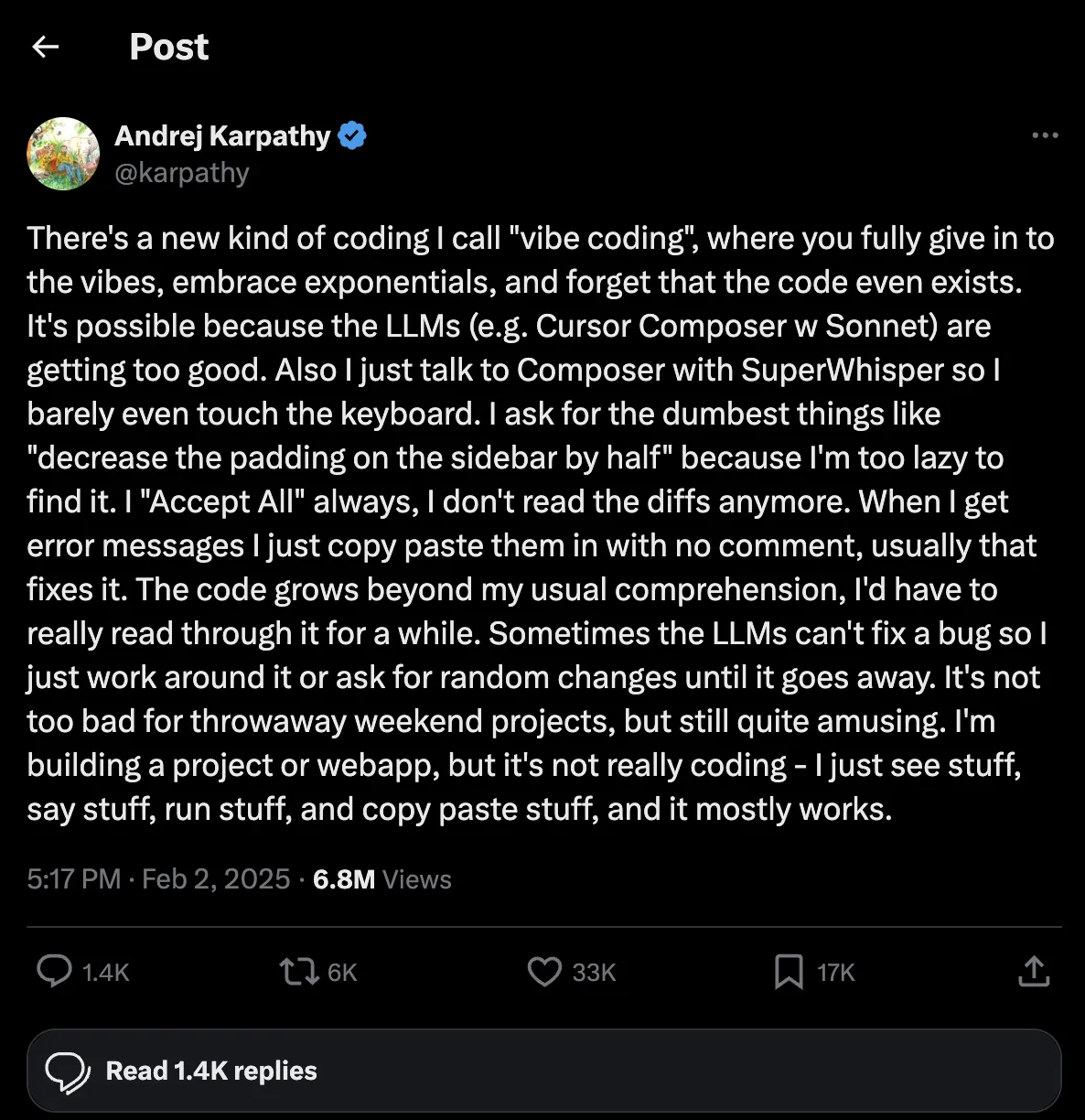
"There's a new kind of coding I call 'vibe coding', where you fully give in to the vibes, embrace exponentials, and forget that the code even exists."
The term caught on quickly. Vibe coding means building software by describing what you want in plain English and letting an AI agent write the code for you. You don't read every line. You don't debug in the traditional sense. You describe the vibe, and the AI handles the implementation.
It sounds wild. But it's real, it's happening right now, and it's changing who gets to build software.
For Decades, Only Programmers Could Build Software
If you wanted to build an app five years ago, you had two options: learn to code yourself (months to years of study) or pay a developer (thousands to tens of thousands of dollars). There was no middle ground.
Programming languages like Python, JavaScript, and Swift were gatekeepers. You needed to understand syntax, frameworks, data structures, APIs, deployment pipelines, and dozens of other concepts before you could ship anything. The barrier to entry was enormous.
That era is ending.
AI Coding Agents Now Rival Professional Developers
Today's AI coding agents don't just autocomplete your code. They architect solutions, write full files, debug errors, run tests, and deploy applications. They understand codebases with hundreds of files. They refactor, they optimize, they explain their reasoning.
This isn't hype. Mike Krieger, Anthropic's CPO, said it plainly in February 2026:
"When Dario was on stage a year-ish ago and was like, 'Oh, by the end of the year, 90% of code is gonna be written by Claude,' people thought it was crazy, but we were already seeing that trajectory. Right now for most products at Anthropic, it's effectively 100%."
Krieger also noted that Anthropic regularly produces 2,000 to 3,000 line pull requests, and that Claude products and Claude Code are being entirely written by Claude. These are some of the best engineers in the world, and they're letting AI do the heavy lifting.
Think about that. The company building the AI is using it to build itself. That's how capable these tools have become.
You'll Go Further With Conceptual Understanding
Here's the thing about vibe coding that most people get wrong: you don't need to be a programmer, but you absolutely benefit from understanding how software works at a conceptual level.
You don't need to memorize syntax. But understanding the basics of the software architecture you are working with will make you dramatically more effective with AI tools.
Here's the simplest version:
The client is whatever the user sees. A website in their browser, a mobile app on their phone. It's public. Anyone can inspect it, view the source code, and see what data it sends and receives.
The server is the backend. It runs on a machine you control. It handles business logic, stores data, talks to databases, and processes payments. The user never sees this code.
The critical rule: Never put secrets on the client. API keys, database passwords, payment processing logic, user authentication... all of that lives on the server. If you put a secret API key in your frontend code, anyone can find it. This is one of the most common mistakes beginners make, and it's one of the most important concepts to understand.
When you understand this client-server model, you can have much more productive conversations with AI. Instead of saying "build me a payment page," you can say "add a Stripe webhook endpoint with signature verification. I set the signing secret in STRIPE_WEBHOOK_SECRET." That's a much better prompt because you know why the verification matters (it proves the request actually came from Stripe, not some random person hitting your server) and where the secret belongs (an environment variable on the server, never in frontend code). That kind of prompt comes from conceptual understanding, not memorizing code.
Learn by Asking Claude
One of the most underrated aspects of AI coding tools is that they're incredible teachers. You can ask Claude to explain why things work the way they do, not just what to type.
- "Why does this API return a 403 error?"
- "What's the difference between server-side and client-side rendering?"
- "Why do we use environment variables instead of hardcoding secrets?"
A quick note: make sure you're asking the smartest coding models available. Lesser models will give you less accurate or constructive answers. Learn from the best teacher you can. As of right now, that's Claude Opus 4.6 and GPT-5.4.
About 90% of the time, the explanation will be accurate and genuinely helpful. You're essentially getting a patient, knowledgeable tutor available 24/7 who never gets frustrated when you ask the same question three different ways.
If you've been around software for a while, you remember what learning used to look like. Google an error, land on Stack Overflow, ask a question, and get your thread closed by some power-hungry, egotistical moderator with 50,000 reputation points hitting you with "marked as duplicate" or "this question does not meet Stack Overflow guidelines." That culture made a lot of developers feel like they couldn't ask for help.
AI doesn't judge you. It doesn't close your thread. It just answers, clearly and patiently, as many times as you need.
This means you can learn software development while building real things. You don't need to complete a 6-month bootcamp before you start. Build something, hit a wall, ask Claude to explain what's happening and why, absorb the concept, keep going.
LLMs Are Powerful, But They Make Mistakes
Here's the honest part. AI coding agents are incredible, but they do make mistakes. They'll write code that works but isn't performant. They'll take a shortcut that introduces a security hole. They'll structure something in a way that becomes a mess as the project grows. If you can't tell whether the AI is doing things in a good way or not, your codebase slowly diverges into something fragile and hard to maintain.
This is why learning the basics matters. Not so you can write every line yourself, but so you can read what the AI wrote and know if it's solid or if it's going to cause problems later.
Skills: The Modern Way to Teach AI
One of the best ways to guide AI agents is through skills. Skills are just markdown files organized in folders that teach the AI rules to follow for specific tasks. Think of them as instruction manuals you write once and the AI references every time it does that kind of work.
Here's what a skill directory looks like:
.claude/
  skills/
    api-writing/
      SKILL.md
    deployment/
      SKILL.md
    testing/
      SKILL.md
Each SKILL.md is a plain text file with rules and examples. Here's a real snippet from an API writing skill:
## Error Handling

### Never Expose Internal Errors to Clients

**Why:** Internal error details (package paths, stack traces,
database errors) leak implementation details and create
security risks.

**Pattern: Wrap mutations in try-catch**
- Log full errors server-side for debugging
- Re-throw intentional errors as-is
- Generic message for unknown errors
- "Please try again" gives users next steps
The best way to learn from skills is to go line by line and understand why each rule exists. Why do we never expose internal errors? Because stack traces reveal your file structure, package versions, and database schema to attackers. Why do we re-throw intentional errors? Because a "not found" error is useful information for the user, but a database connection string in an error message is a security incident.
This is tedious, but it teaches a lot if the creator of that skill has real experience behind it. It's the same way developers have always learned best. Back in the day, I found the best way to learn was to go line by line through code understanding the syntax. What does this symbol do? When do you use X vs Y? Now it's just English, and understanding why we tell an agent certain rules is the new era of coding. But like any skill, it takes patience. Learning is never easy.
Claude vs ChatGPT for Coding
Let's be direct about this: for the past 8+ months and as of today, Claude is the strongest AI for coding tasks. Specifically for Python and web development (JavaScript, TypeScript, React, Next.js), Claude, specifically the Opus 4.6 model, consistently produces better code and understands project context more deeply than ChatGPT's models.
That said, ChatGPT is also very capable. GPT-5.4 is a strong model, and for many tasks the difference is marginal. If you're already comfortable with ChatGPT, you'll still get great results.
But if you're choosing where to invest your time learning AI-assisted development, Claude is the better bet for coding right now. Could that change next month? Absolutely. AI is moving incredibly fast, and any model could leapfrog the others with a single release. But as of today, Claude is the one to beat for software development.
The Tools Developers Actually Use
Vibe coding isn't just about chatting with an AI in a browser window. The developers pushing the cutting edge are using CLI tools, command-line interfaces that give AI agents direct access to your codebase, your terminal, and your development environment.
Claude Code is Anthropic's official CLI tool. It runs in your terminal, reads and writes files in your project, runs commands, and acts as an autonomous coding agent. It can explore your entire codebase, understand how things connect, and make changes across multiple files. This is what serious AI-assisted development looks like. Not copy-pasting from a chat window, but an agent that works directly in your project.
OpenAI Codex CLI is OpenAI's equivalent. It gives GPT models terminal access to work directly in your codebase, similar to Claude Code.
There are also AI-powered editors like Cursor, Windsurf, GitHub Copilot, and others that integrate AI directly into your code editor. These tools have been wrappers on top of the same APIs that were originally built for developers. They're useful, but most people only use about 5% of the functionality these powerful tools actually offer.
The Real Cost of AI Coding
Here's something most people don't think about: not all AI coding tools give you the same value for your money.
If you use a platform like Lovable or similar "build me an app" services, you're paying for AI credits with a 60%+ markup on top. You're paying for convenience, but you're burning through credits fast at inflated prices.
If you use the APIs directly (Anthropic API, OpenAI API), you're still looking at a 2x to 10x markup compared to what the subscription plans offer for the same amount of usage.
The most cost-effective way to use AI for coding is through the apps themselves. Claude Pro ($20/month), Claude Max ($100/month), ChatGPT Plus ($20/month), ChatGPT Pro ($200/month). And the CLI tools, Claude Code and Codex CLI, are included with those subscriptions. They're not necessarily the prettiest interfaces, but they give you the most tokens at the right price. That matters when you're building something real and burning through thousands of tokens a day.
These tools are what developers at companies like Anthropic, Google, and thousands of startups use every single day. Nothing is slowing down. Adoption is accelerating.
The Future is Exciting
Here's what gets me fired up: everyone now has the ability to work through development challenges with Claude or ChatGPT and figure out how to deploy a real application. The barriers that kept people out of software development for decades are falling fast.
Is software development frustrating sometimes? Absolutely. You'll hit bugs that make no sense. You'll spend an hour on something that should take five minutes. Deployments will fail at midnight. That's the nature of building things.
But the tools we have available today are genuinely amazing, and they're getting better every month. You can truly turn your ideas into working code.
My advice if you have an idea: just start. Don't overthink the architecture. Don't worry about picking the perfect tech stack. Don't wait until you've "learned enough." Open Claude Code or ChatGPT and start describing what you want to build.
See if you can deliver something valuable to 1 person. Then 2. Then 5. Slowly grow. As you grow, you'll learn new things. About your users, about the technology, about what actually matters versus what you thought mattered.
The people building the future aren't waiting for permission. They're vibe coding.
Read next: Why I Built YoAmigo: the story behind the platform, what I got wrong, and why I landed on a local-first desktop tool.
Building something? Yoamigo is a vibe coding tool for full-stack web apps. Bring your own ChatGPT, no markup on hosting.

About the Author
Dominic Cicilio
Independent developer with 10+ years of experience building software. Former early engineer at a security-first startup, now creator of YoAmigo.
There's a better way to build for the web.
See if Yoamigo is right for you.
See If This Is Right for Me